> ## Documentation Index
> Fetch the complete documentation index at: https://headgate.mintlify.site/llms.txt
> Use this file to discover all available pages before exploring further.
# Operations console
> Embed the TanStack Start console in Go or Rust and mount it behind your authentication boundary.
The console provides queue health, job search and detail, admission explanations, workflow
graphs, rate classes, quarantine, schedules, and worker controls.
## Jobs stay visible while you inspect
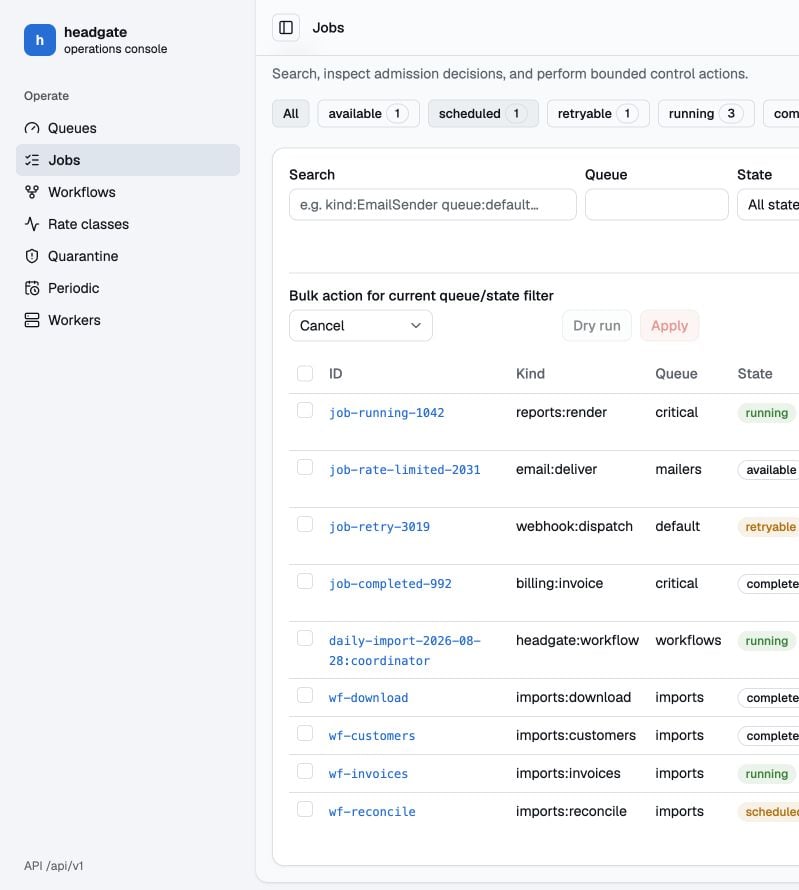
The jobs route combines state filters, structured search, queue/state bulk actions, and a
paginated job table. Selecting a job opens a route-owned detail sheet instead of replacing
the list, so operators keep their search and surrounding jobs in view.
The **archived** filter is the dead-letter queue. Open an archived job to diagnose its
errors and payload, retry one job from the detail sheet, or select reviewed rows for a
bounded redrive. `quarantined` and `undecodable` remain separate filters because their
recovery paths are different.
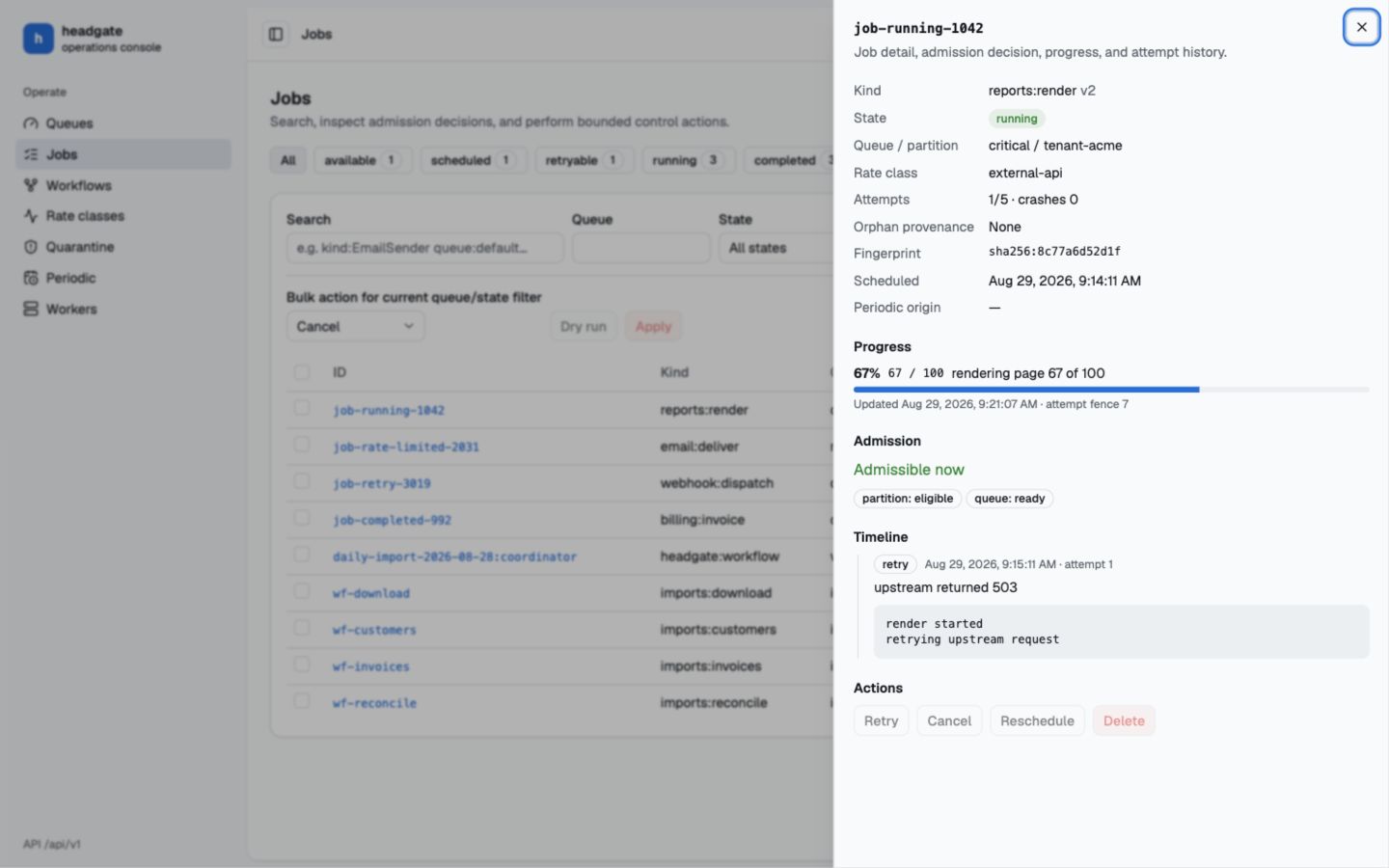 The sheet shows the task identity, a Created → Scheduled → Wait → Running → terminal
lifecycle, queue and partition, rate class, attempts and crash attempts, orphan provenance,
fingerprint, schedule, progress, current admission decision, attempt history, payload,
metadata, output, resumable-step checkpoint, and permitted actions.
The admission section distinguishes an actual policy block from lifecycle state: pending
jobs wait for promotion, running jobs are already admitted, and terminal jobs no longer
participate in admission. A missing `blocked_by` value is never presented as an invented
“unknown policy.”
Wait and Running durations advance once per second while their stage is live. Waiting,
active, completed, failed, and pending stages use distinct colors; nodes and connectors
enter progressively, with motion disabled when the operating system requests reduced motion.
Opening the sheet explicitly requests the selected job's payload; list and search
responses remain payload-free.
Checkpoint inspection is also explicit: opening job detail requests the dedicated
`/jobs/{id}/checkpoint` endpoint. The resumable section shows completed/current steps,
cursor state, step-set identity, and per-step crashes; ordinary list and job responses do
not carry cursor bytes.
Encrypted payloads are detected from Headgate's versioned envelope header. The console
shows the encryption version, key ID, and copyable ciphertext, but never receives a key or
decrypts the payload in the browser.
Periodic schedule event selection is URL-backed as `?events=`, so an event
view can be shared, refreshed, and traversed with browser history. Missed-run policies use
operator-facing labels and explanations rather than exposing only the wire enum. **Enqueue
now** creates one extra job without moving the schedule's normal next-run time.
## Workflows show live execution state
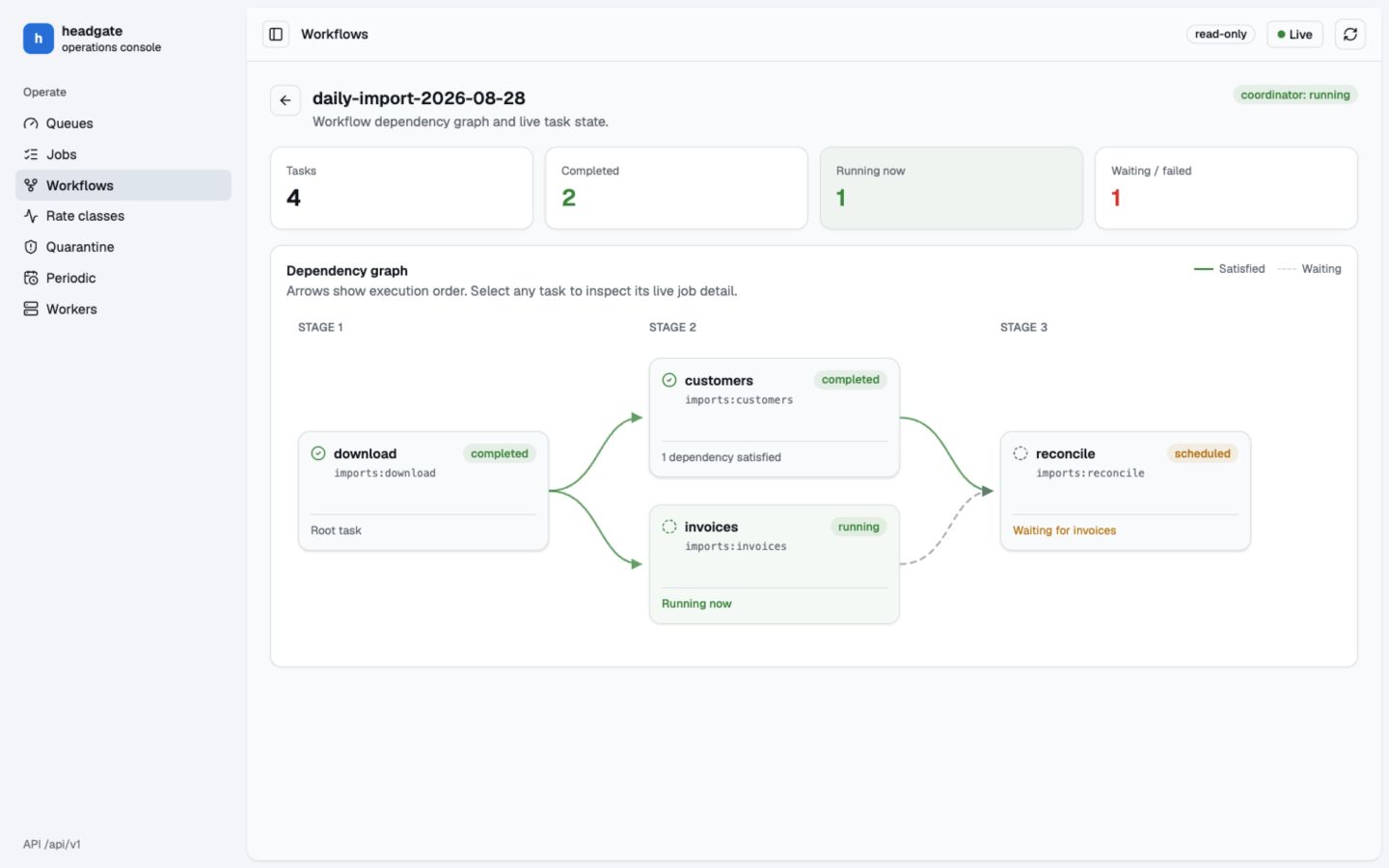
The workflow view renders dependencies as connected stages. Completed edges are solid,
waiting edges are dashed, and the currently running card is highlighted. Every task card
links to its ordinary job detail, including the same progress and attempt history available
from the Jobs route.
The sheet shows the task identity, a Created → Scheduled → Wait → Running → terminal
lifecycle, queue and partition, rate class, attempts and crash attempts, orphan provenance,
fingerprint, schedule, progress, current admission decision, attempt history, payload,
metadata, output, resumable-step checkpoint, and permitted actions.
The admission section distinguishes an actual policy block from lifecycle state: pending
jobs wait for promotion, running jobs are already admitted, and terminal jobs no longer
participate in admission. A missing `blocked_by` value is never presented as an invented
“unknown policy.”
Wait and Running durations advance once per second while their stage is live. Waiting,
active, completed, failed, and pending stages use distinct colors; nodes and connectors
enter progressively, with motion disabled when the operating system requests reduced motion.
Opening the sheet explicitly requests the selected job's payload; list and search
responses remain payload-free.
Checkpoint inspection is also explicit: opening job detail requests the dedicated
`/jobs/{id}/checkpoint` endpoint. The resumable section shows completed/current steps,
cursor state, step-set identity, and per-step crashes; ordinary list and job responses do
not carry cursor bytes.
Encrypted payloads are detected from Headgate's versioned envelope header. The console
shows the encryption version, key ID, and copyable ciphertext, but never receives a key or
decrypts the payload in the browser.
Periodic schedule event selection is URL-backed as `?events=`, so an event
view can be shared, refreshed, and traversed with browser history. Missed-run policies use
operator-facing labels and explanations rather than exposing only the wire enum. **Enqueue
now** creates one extra job without moving the schedule's normal next-run time.
## Workflows show live execution state
The workflow view renders dependencies as connected stages. Completed edges are solid,
waiting edges are dashed, and the currently running card is highlighted. Every task card
links to its ordinary job detail, including the same progress and attempt history available
from the Jobs route.
 The console currently covers:
| View | Operational questions it answers |
| ------------ | ----------------------------------------------------------------------------- |
| Queues | How quickly is backlog draining, and which partitions are waiting? |
| Jobs | What is running, retrying, scheduled, quarantined, or undecodable? |
| Workflows | Which tasks completed, which task is running, and what is blocked? |
| Rate classes | Which fleet limits are active, saturated, or paused? |
| Quarantine | Which fingerprints repeatedly crash and can be released? |
| Periodic | Which schedules are enabled, and when will they run next? |
| Workers | Which workers are live, what they serve, and which control signal is pending? |
## Worker controls are state-aware
The worker row separates a command waiting in the store from the state acknowledged by
the worker heartbeat. While a command is pending, conflicting controls remain disabled.
After acknowledgement:
* **Quiet** stops new admission while current jobs finish; only **Resume** becomes available.
* **Resume** returns a quiet worker to admission; **Quiet** becomes available again.
* **Rolling restart** releases singleton duties, drains without the ordinary shutdown
deadline, and exits for the process supervisor to replace.
* **Resign duties** releases scheduler, reclaimer, quarantine, retention, and operations
leases without stopping ordinary job processing. It stays disabled until process restart.
* **Terminate** releases duties and performs the configured bounded graceful shutdown.
Restarting and terminating workers expose those states in the row and accept no further
commands. A disabled control includes a browser tooltip explaining why it is unavailable.
## Data architecture
* Every view owns its TanStack file route.
* TanStack Query owns reads, polling, mutations, and invalidation.
* The UI calls the OpenAPI control surface; it never connects to a store directly.
* Built assets are embedded in both language packages.
* List and search responses exclude payloads. Opening an individual job is the explicit
payload request and should therefore sit behind the same operator authentication as the
rest of the control plane.
```rust Rust theme={"system"}
let app = axum::Router::new()
.nest("/api/v1", headgate_api::router(store, api_config))
.nest_service("/admin/jobs", headgate_ui::router(headgate_ui::Config {
api_base: "/api/v1".into(),
read_only: false,
}));
```
```go Go theme={"system"}
mux.Handle("/api/v1/", headgateapi.HandlerWithConfig(store, apiConfig))
mux.Handle("/admin/jobs/", http.StripPrefix("/admin/jobs",
headgateui.NewHandler(headgateui.Config{
APIBase: "/api/v1",
ReadOnly: false,
})))
```
Headgate does not invent your application's identity model. Authenticate and authorize the
console and API at the embedding boundary.
`ReadOnly` disables mutation controls for clarity. Configure read-only mode on the control
API as well; disabled browser controls are not an authorization boundary. Content-hashed
assets are cached immutably, while the SPA shell is served with `no-cache` so its injected
API base and read-only configuration stay current.
Inspect realistic jobs, workflows, policies, workers, and schedules without a database.
The console currently covers:
| View | Operational questions it answers |
| ------------ | ----------------------------------------------------------------------------- |
| Queues | How quickly is backlog draining, and which partitions are waiting? |
| Jobs | What is running, retrying, scheduled, quarantined, or undecodable? |
| Workflows | Which tasks completed, which task is running, and what is blocked? |
| Rate classes | Which fleet limits are active, saturated, or paused? |
| Quarantine | Which fingerprints repeatedly crash and can be released? |
| Periodic | Which schedules are enabled, and when will they run next? |
| Workers | Which workers are live, what they serve, and which control signal is pending? |
## Worker controls are state-aware
The worker row separates a command waiting in the store from the state acknowledged by
the worker heartbeat. While a command is pending, conflicting controls remain disabled.
After acknowledgement:
* **Quiet** stops new admission while current jobs finish; only **Resume** becomes available.
* **Resume** returns a quiet worker to admission; **Quiet** becomes available again.
* **Rolling restart** releases singleton duties, drains without the ordinary shutdown
deadline, and exits for the process supervisor to replace.
* **Resign duties** releases scheduler, reclaimer, quarantine, retention, and operations
leases without stopping ordinary job processing. It stays disabled until process restart.
* **Terminate** releases duties and performs the configured bounded graceful shutdown.
Restarting and terminating workers expose those states in the row and accept no further
commands. A disabled control includes a browser tooltip explaining why it is unavailable.
## Data architecture
* Every view owns its TanStack file route.
* TanStack Query owns reads, polling, mutations, and invalidation.
* The UI calls the OpenAPI control surface; it never connects to a store directly.
* Built assets are embedded in both language packages.
* List and search responses exclude payloads. Opening an individual job is the explicit
payload request and should therefore sit behind the same operator authentication as the
rest of the control plane.
```rust Rust theme={"system"}
let app = axum::Router::new()
.nest("/api/v1", headgate_api::router(store, api_config))
.nest_service("/admin/jobs", headgate_ui::router(headgate_ui::Config {
api_base: "/api/v1".into(),
read_only: false,
}));
```
```go Go theme={"system"}
mux.Handle("/api/v1/", headgateapi.HandlerWithConfig(store, apiConfig))
mux.Handle("/admin/jobs/", http.StripPrefix("/admin/jobs",
headgateui.NewHandler(headgateui.Config{
APIBase: "/api/v1",
ReadOnly: false,
})))
```
Headgate does not invent your application's identity model. Authenticate and authorize the
console and API at the embedding boundary.
`ReadOnly` disables mutation controls for clarity. Configure read-only mode on the control
API as well; disabled browser controls are not an authorization boundary. Content-hashed
assets are cached immutably, while the SPA shell is served with `no-cache` so its injected
API base and read-only configuration stay current.
Inspect realistic jobs, workflows, policies, workers, and schedules without a database.